How should rules be evaluated?
Performance wise there is a clear winner as to approach for generating results:
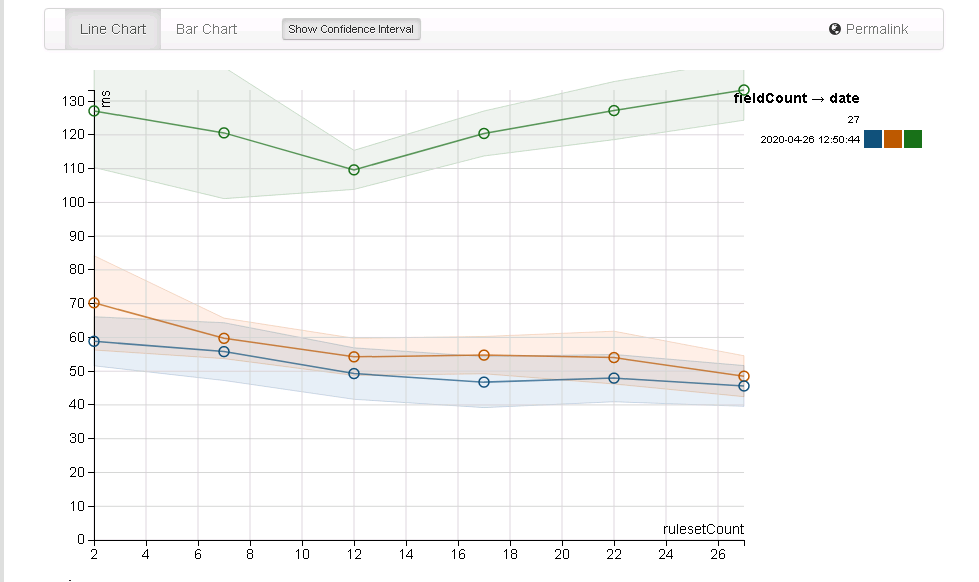
The green row is using the map function which is unfortunately the most straightforward to program. The blue is the baseline of processing a row without DQ and the orange is using withColumn.
withColumn can use UDFs or inbuilt Catalyst style functions - the latter giving better performance and ability to more naturally integrate with spark, this review echos the findings and hinting at the effects of catalyst.
Overall storage winner is nested columns, it has lower storage costs, is as fast as json to serialize (via an Expression) and faster to query with predicate push down support for faster filtering. Details of the analysis are below.
Chains of withColumn is strongly discouraged
Using withColumn is strongly discouraged, it very quickly introduces performance issues in spark code, prefer to use select and the Quality transform functions. A large part of the performance hit for using UDFs over Expressions is due to the conversion from user types to InternalRow - this cannot be avoided.
Since 3.4 you can also try to use LCA by refering to a runner by name then using expr("runnerName....") in the same select / projection.
What does the performance actually look like?
In short - Quality will typically run faster than native Spark SQL code, how much so depends on your rules and often the appropriate use of FunReWrite
Run on Spark 4.1 the following (on GitHub 4 core 16gb runners) shows a simple DQ run with 15 rules, with a baseline "boolean array" result (the bottom orange) and an audit trail version using pure spark (the top blue line):
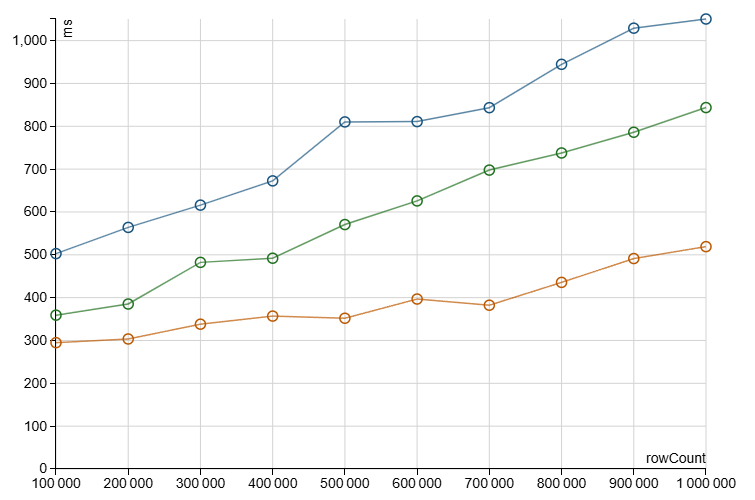
The middle green line is the performance of Quality (at about 843ns per row's 15 rules, or 56ns per rule) with user functions abstracting repetitive case statement logic. Although the Quality rule processing is faster the use of user functions requires the FunNRewrite optimisation, e.g. via enableFunNRewrites, Spark does not optimise subexpressions for user functions.
What about the number of rules?
As the number of rules increases the overhead of the audit trail also increases. In the native SQL audit trail case the Spark primitives CreateArray uses the following logic for each row (from 4.1):
s"""ArrayData $arrayName = ArrayData.allocateArrayData(
  $elementSize, $numElements, "$additionalErrorMessage");"""

val assignments = elementsExpr.zipWithIndex.map { case (expr, i) =>
  val eval = expr.genCode(ctx)
  val setArrayElement = CodeGenerator.setArrayElement(
    arrayDataName, elementType, i.toString, eval.value)

  val assignment = if (!expr.nullable) {
    setArrayElement
  } else {
    s"""
       |if (${eval.isNull}) {
       |  $arrayDataName.setNullAt($i);
       |} else {
       |  $setArrayElement
       |}
         """.stripMargin
  }
  s"""
     |${eval.code}
     |$assignment
       """.stripMargin
}
CreateMap does similar with two arrays, i.e. for each row of input data the audit trail can create multiple new arrays, each of which must be initialised.
The performance test simulates rule id, filling the key array with literals of the rules indices, which must take place for every row.
Similarly, the default "failure" state (e.g. Failed or Unevaluated) must be set for each value entry in the audit (equivalent to the setNullAt in the above Spark sample code).
Quality, as of 0.2.0, knows about the types involved does can instead:
- create a "default" result row, using custom Int and Long row types with underlying primitive arrays
- initialise this row once per partition, saving ruleid's and the default "failure" state
- for each row use clone on the "default" row
- primitive arrays use memcpy when cloning, and do not zero/null out, or force the use of fill loops
So although Quality must also create the same number of same-sized arrays the Id key arrays do not need to be re-filled, nor does each entry in the value array need its default filled. Given ruleEngineRunner can avoid calling entries entirely by early exiting or using TriggerGrouping (as of 0.2.0), this can provide substantial speed benefits on very large rulesets.
The actual expression code which is generated is of course the same, only that TriggerGrouping may also further reduce runtime costs by forcing sub expression evaluation to be in more appropriate compilation units.
How big can the rule suite be?
With Quality 0.2.0 rule engine and TopLevelBooleanGrouper runs of exact boolean 'and' matches (e.g. truth tables) can process a 20k RuleSuite in sub 0.03ms per row, or 3.68ms per row when not using grouping (184ns per rule).
Please reach out if there are interesting performance bottlenecks or even larger RuleSuite sizes and complexity.
Created: July 19, 2026 14:57:14